Published
- 4 min read
Avoid turning your small .NET app into a monster
In the last post, I started a new project: a ChatGPT clone for writing LinkedIn posts.
But before writing any code, let’s quickly lay out the requirements and analyze them.
Requirements
1. Generate LinkedIn Posts
- I type in a topic, and the tool writes a professional LinkedIn post for me
- The post should sound natural and engaging, not robotic
- Posts should be the right length (not too short, not too long)
2. Learn My Writing Style
- I want to upload my existing LinkedIn posts
- The tool should study how I write and copy my voice
- Generated posts should sound like ME, not generic AI
3. Save My Posts
- Keep all the posts the tool generates for me
- Let me go back and see the old posts I created
4. Manage My Account
- Create an account with an email and a password
- Log in securely
- Reset my password if I forget it
5. See Results in Real-Time
- Watch the post being written word by word (like ChatGPT)
- Don’t make me wait for the whole thing to finish
Analyzing the non-functional requirements
After going through the requirements, three non-functional requirements stand out:
- Simplicity - A small set of requirements. It’s a focused tool with a single purpose: generate LinkedIn posts. The architecture should be easy to explain, modify, and deploy.
- Performance - AI calls are slower than regular database queries. If users wait 15 seconds staring at a blank screen, they’ll close the tab. The system must feel responsive.
- Security - I’m dealing with user accounts, passwords, and potentially API keys for AI providers. Authentication, authorization, and secret management are crucial.
Choosing the architecture
Instead of guessing or picking a generic architecture, I pull out the Architecture Style Decision Matrix from the Zero to Architect Playbook course. It contains a comparison of different architectural styles based on non-functional requirements.
Based on it, the suggested approach is Vertical Slice Architecture.
Why?
Well, this is covered in the course, but from my experience and research, Vertical Slice Architecture is a good choice for a small app or internal tool.
Quick overview of Vertical Slice Architecture (VSA)
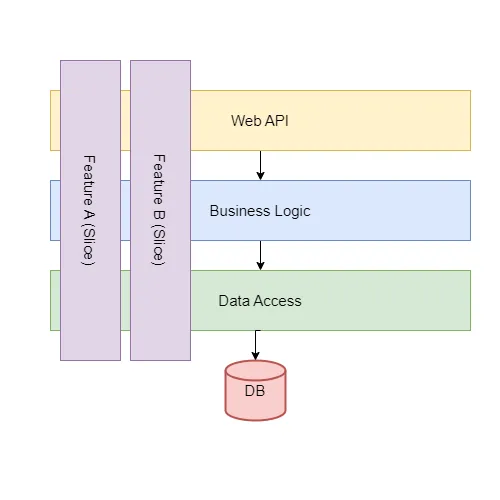
Vertical Slice Architecture organizes your application around features rather than technical layers.
This means that each slice contains everything needed to implement a single use case, from API endpoint to data access.
But instead of separating code into horizontal layers like API, Business Logic, and Data Access Layer, you group it by business capability, such as CreateOrder or RegisterUser.
Benefits?
This approach simplifies implementation, and you can more easily add, modify, or remove features without affecting unrelated parts of the system.
How to set up VSA inside a .NET solution
In VSA, you typically use a single ASP.NET Core project.
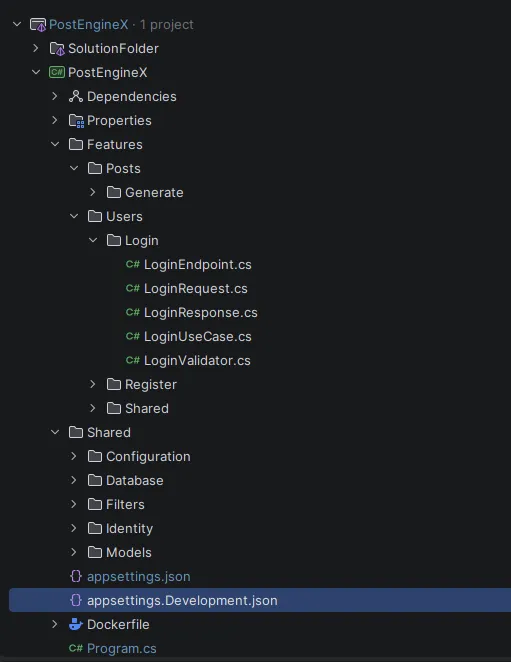
The Features folder is the most important folder where you put functionality.
So you’ll see:
       Features/
  Posts/
    Generate/
  Users/
    Login/
    Register/
Each of those folders represents one use case.
Inside each folder, you put the following files:
LoginEndpointLoginRequestLoginResponseLoginUseCaseLoginValidator
The Endpoint uses Minimal API and implements a custom IEndpoint interface.
       public interface IEndpoint
{
    void MapEndpoint(IEndpointRouteBuilder app);
}
Then, during initialization, you use custom, reusable logic to find all IEndpoint interfaces and register the endpoints.
This keeps the Minimal API approach organized, so you don’t have to manually add new endpoints.
What about shared code?
I’m glad you’ve asked.
If everything lives inside feature folders, where do you put the stuff everyone needs?
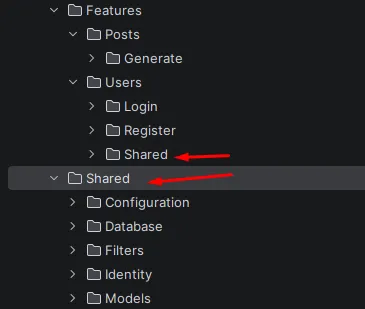
Use the Shared folder.
The Shared folder is mainly infrastructure and cross-cutting concerns, not for business logic. Also, you can have the Shared folders on a few levels:
- You can share code inside a single feature,
- Or have code that all features use.
Once we have this initial backend setup, the next task is to start working on the frontend.
In the next post, I’ll show you how I used AI agents to quickly prototype the frontend using React.
But also, how I had to manually fix frontend bugs because the AI got stuck on CSS.
Every Friday I reveal insights with frameworks, tools & easy-to-implement strategies you can start using almost overnight.
Join the inner circle of 13,300+ .NET developers