Published
- 8 min read
9 "do or die" API interview questions
Today’s issue is brought to you by Web Dev with an AI Sidekick .
Start from zero and learn web development by building a real survey website with AI as your coding partner, guiding you through each concept, exercise, and deployment step in a practical, beginner-friendly way.
Written by Mark Price.
Find out more here: Master web dev with an AI sidekick
A few years ago, I joined a .NET project as a backend developer.
But when I first opened the solution, I was left amazed. Not by the beauty and elegance of code inside, but by the numerous mistakes the previous developers made while designing and building the Web Api.
Look, it’s not their fault.
Mistakes happen due to a lack of experience, a lack of knowledge, and a lack of a proper code review process.
Over the next few years, I worked hard to fix as many mistakes as possible.
Therefore, if I were to interview YOU today for a .NET position, one of the areas I might ask you is Web API design.
Why is that?
Because building production-ready APIs is not optional knowledge, but a foundation of almost everything you build. And based on the mistakes I keep seeing in production codebases, I’ve put together 9 API questions to test your knowledge of this subject.
As a bonus, at the end of this email, you can find a free PDF that you can use whenever you need to design new API endpoints.
Now, let me start the interrogation.
1. How should you design REST API endpoints - around actions or resources?
Your API isn’t a list of commands.
It’s a map of the things your system works with.
Therefore, model your endpoint names around resources, not actions. That way, it’s easier to understand, easier to test, and far easier to extend later on.
Think less “do this” and more “here’s what exists.”
3 quick tips:
- Use nouns in endpoints, not verbs. YES - /users. NO - /getUserWithDetails
- Distinguish collections from a single item. COLLECTION - /orders. SINGLE ITEM /orders/123
- Let HTTP methods express intent.
- POST - create a resource
- GET - retrieve
- PUT - update
- DELETE - remove
When designing an API endpoint, think “What resource am I working with?”, rather than “What function do I need to call?“
2. What’s the difference between PUT and PATCH?
They are similar in that they update the existing resources.
But they are not the same:
- PUT - replaces the entire resource. You send the full object, even if only one field changed.
- PATCH - partially updates a resource. You send only the fields you want to change.
Example: setting an order status to “Shipped”? That’s a PATCH, not a PUT. Because you’re updating a single field, not replacing the entire order.
In practice, developers use PUT to send the entire object when they need to update it in the database. That’s fine. Nothing wrong with that.
Just be aware, that in the cases where you want an endpoint that screams:
“I’LL UPDATE JUST ONE FIELD!!!!”
You want to use PATCH.
3. Your API returns 200 OK for everything, even errors. What’s wrong with that?
The .NET project, which I’ve mentioned at the beginning of the post, had this “pattern” in most of the endpoints.
“But is that a really bad thing, Kristijan?” I hear you asking me.
Yes.
Because when you return 200 - OK, the client’s immediate reaction is like “Oh, I succeeded.”
Then they unpack the response body and see:
       IsSuccess: false
Error: "the first name and last name should be populated."
Bad API communication and bad API design.
Instead, there are a range of HTTP status codes you could return:
- 200 OK - Request succeeded.
- 201 Created - New resource created (after a POST).
- 204 No Content - Success, but nothing to return.
- 301 Moved Permanenty - The resource has moved to a new URL permanently.
- 400 Bad Request - Client sent invalid input.
- 401 Unauthorized - User isn’t authenticated.
- 403 Forbidden - Authenticated, but not allowed.
- 404 Not Found - Resource doesn’t exist.
- 409 Conflict - Conflict with the current state of the resource.
- 500 Internal Server Error - Something blew up on the server.
Or, in summary:
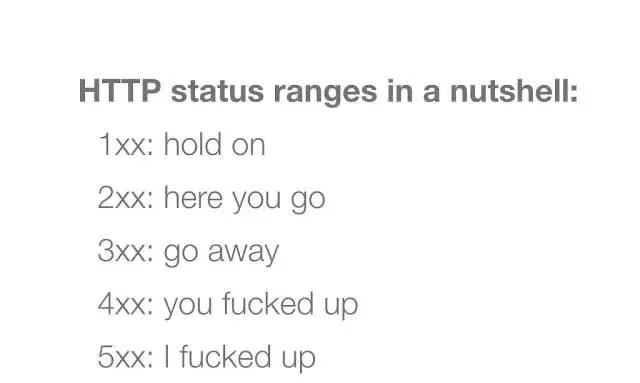
Image credit
4. How would you validate input in a REST API, and why does it matter?
Expecting users to send valid data is like expecting your laptop to run faster when you’re in a hurry.
It just doesn’t happen.
If you don’t validate input, bad data sneaks in. And once it’s in your database, it spreads bugs, crashes endpoints, and creates support tickets.
The rule is simple: validate all incoming data at the boundary. Never trust the client.
In .NET, use FluentValidation. It gives you .NotNull(), .NotEmpty(), .EmailAddress(), .Length(1, 250), and more. Return 400 Bad Request for invalid input immediately. Don’t let the request go deeper into the system.
The more validation you do at the start of the flow, the fewer data fixes you’ll have to do later.
5. A user hits your API and gets back a full stack trace. What went wrong?
In older ASP.NET apps, it was called the Yellow Screen of Death.
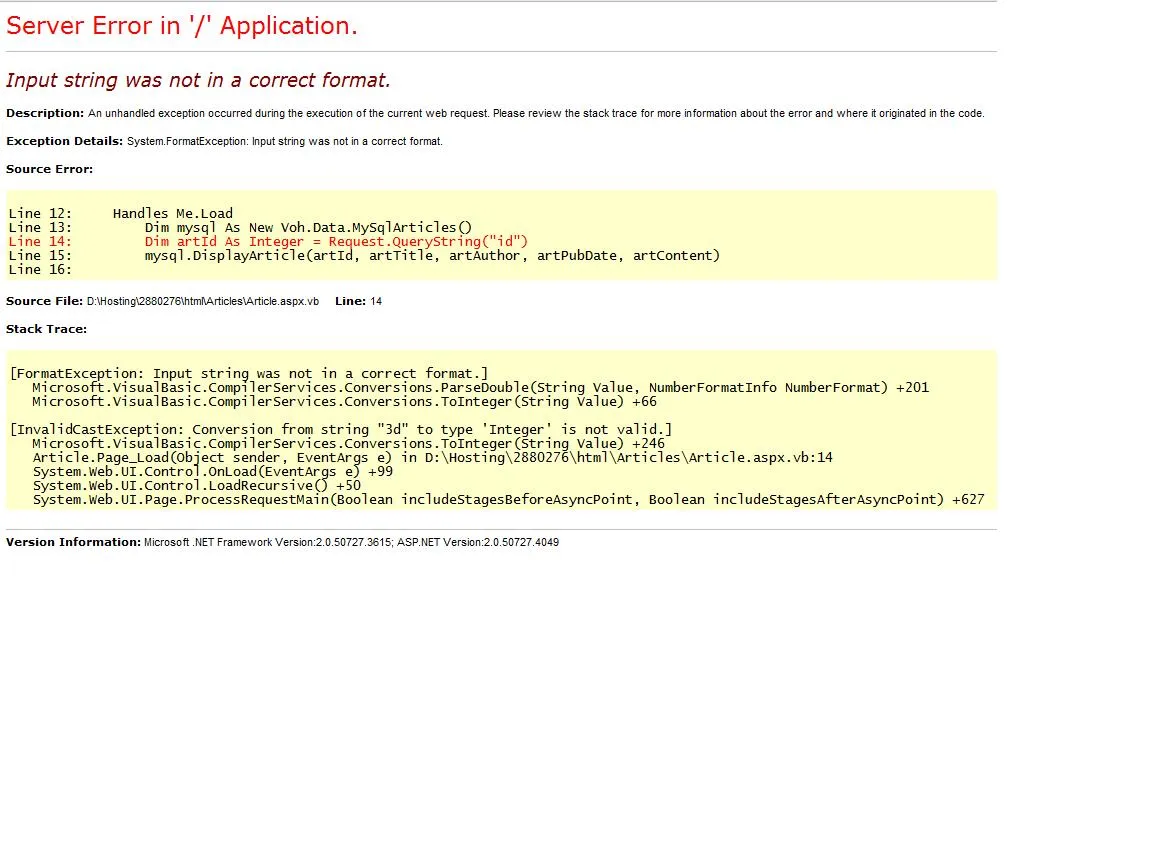
Image credit
Exception messages, stack traces, inner exceptions. All exposed to the user.
That’s essentially handing out your source code to strangers.
Here’s what you should do instead:
- Catch exceptions globally using middleware or IExceptionHandler.
- Log the full error with a stack trace (e.g. to the Serilog).
- Return a clean, generic 500 response to the client.
- Never expose raw exception messages, SQL errors, or internal paths.
The user doesn’t need to see “NullReferenceException at Line 47 of UserService.cs.”
They need to see:
“Something went wrong. Please try again.”
6. Your endpoint takes 30 seconds to respond. How do you fix it?
This can be fixed depending on how the endpoint should behave.
If the data needs to be returned immediately, do this:
- Check and fix the underlying database queries or the executing code.
- If the code and DB queries is already optimized, but there is still some heavy processing involved, what you can do is to retrieve and summarise/calculate data ahead of time. So that’s ready when needed.
However, if the data doesn’t have to be available immediately, do this:
- Client sends a request.
- API responds immediately with 202 Accepted.
- Background service handles the heavy lifting (Hangfire, Quartz.NET, or a message queue like RabbitMQ).
- Client polls or gets notified when it’s done.
Your API should feel fast, even when it has heavy work to do behind the scenes.
7. Your API returns 5,000 records in one response. What would you change?
No one wants to wait for an API to deliver 5,000 records in one go.
And most users won’t scroll past the first 50 anyway.
3 things to do:
- Return small chunks: 20-50 records at a time. Use Skip() and Take() in Entity Framework Core.
- Add filtering through query parameters. For example: GET /products?category=Electronics&minPrice=500
- Return only the fields you need. Use projection instead of returning full entities.
It’s easier to have a fast endpoint when you only need to return a chunk of rows.
8. How would you secure a REST API?
5 things to mention in an interview:
- Authentication - Use JWTs, API keys, or OAuth. Don’t trust anonymous traffic.
- Authorization - Just because a user is logged in doesn’t mean they can do everything. Validate roles and permissions.
- HTTPS - Always. No exceptions.
- Input sanitization - Don’t trust any data coming outside of your system.
- Rate limiting - Restrict the number of requests a client can make within a time frame.
The other thing that you need to be aware of is the OWASP Top 10 list.
It’s a security awareness document that represents the list of the most critical risks to web applications. You don’t have to know all items on the list, just that the list exists and a few examples of security risks.
9. What does it mean for an API to be idempotent, and which HTTP methods are idempotent?
Idempotency means that making the same request multiple times produces the same result as making it once.
- GET - Idempotent. Retrieving the same resource 10 times returns the same result.
- PUT - Should be idempotent. Replacing a resource with the same data should result in the same outcome. In reality, there might be cases where this is not 100% true, for example, if you have a LastUpdated datetime field.
- DELETE - Idempotent. Deleting the same resource twice? It’s gone after the first call. The second changes nothing.
- POST - Not idempotent. Creating a resource twice creates two resources.
- PATCH - Depends on the implementation.
Why do we bother with idempotency, anyway?
Because in real systems, network failures can and will happen. Requests get retried. If your endpoint isn’t idempotent when it should be, retries can create duplicate orders, double charges, or corrupted data.
Recap
If you know the answers to all these 9 questions, congrats. You are hired.
But if some of those questions left you off guard, don’t worry.
Study the above questions few more times, and you will be ready in no time.
Every Friday I reveal insights with frameworks, tools & easy-to-implement strategies you can start using almost overnight.
Join the inner circle of 13,800+ .NET developers