Published
- 8 min read
This is how ChatGPT-style streaming works in .NET
(This is the 3rd email in the series. For more context, read the first post and the second post.)
In the last email, I analyzed the requirements and, based on them, chose the Vertical Slice Architecture.
Now, let me vibe-code the frontend.
And use one of the best .NET 10 features for communication between frontend and backend.
Vibe-coding frontend
I open the VS Code and write as an AI prompt:
“Create a ChatGPT-like web application using React for generating LinkedIn posts. The application name is “PostEngineX”.
***Main Interface (Chat Area):*** - Display a title at the top: “What do you want to create a post about?” - Below the title, include a text input field for user messages - The interface should resemble a chat application layout
***Sidebar:*** - Position: Left side of the screen - Top section: A button labeled “New Post” (or similar) for creating a new conversation - Middle section: A scrollable list of previous posts/conversations, with each item separated by a divider/separator line - Bottom section: User profile area containing: - User profile picture - User name displayed next to the profile picture
***Additional Requirements:***
- Use modern React practices (functional components with hooks)
- Use ShadCN for components
- Ensure the UI is responsive and clean
- Apply the brand colors consistently throughout the design
- The main color (#476C9B) should be used for primary UI elements
Please create the complete React component structure with appropriate styling.”
After such a detailed prompt, you would expect something decent.
But the first result?
This horror.
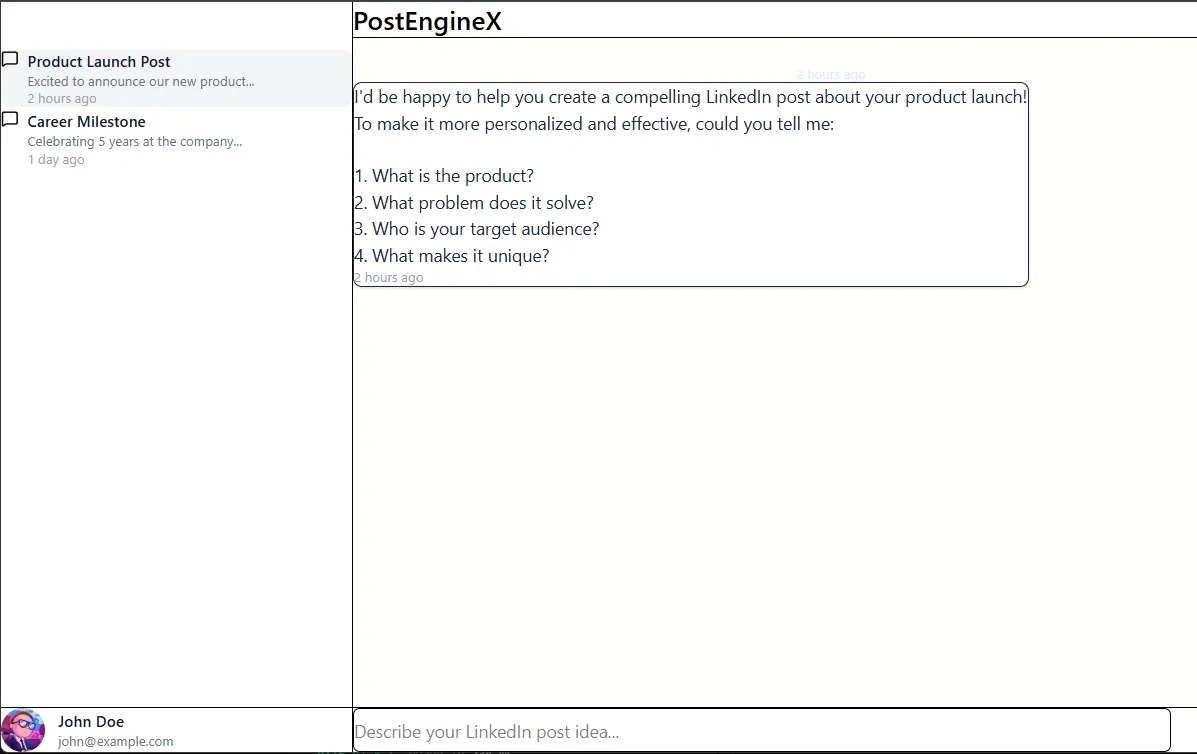
What the heck?
I continue to prompt:
- Me: “make the chat ui more modern, the button new post is not visible, also, every post in sidebase chat history should have a delete option”
- — AI works and delivers the next iteration. Bad.
- Me: “it’s getting better, but the spacing is horrible still”
- — AI works and delivers the next iteration. Still the same.
- Me: “padding is still too small”
- — AI works and delivers the next iteration.
- Me: not sure if something is blocking these changes, but I see no difference
- Obviously, the AI is now stuck, since it can’t sort out the spacing. So I intervene: “is there a global CSS that is affecting this? investigate”
- And there it was: a global CSS setting padding to 0.
After that, I very quickly came to this UI interface:
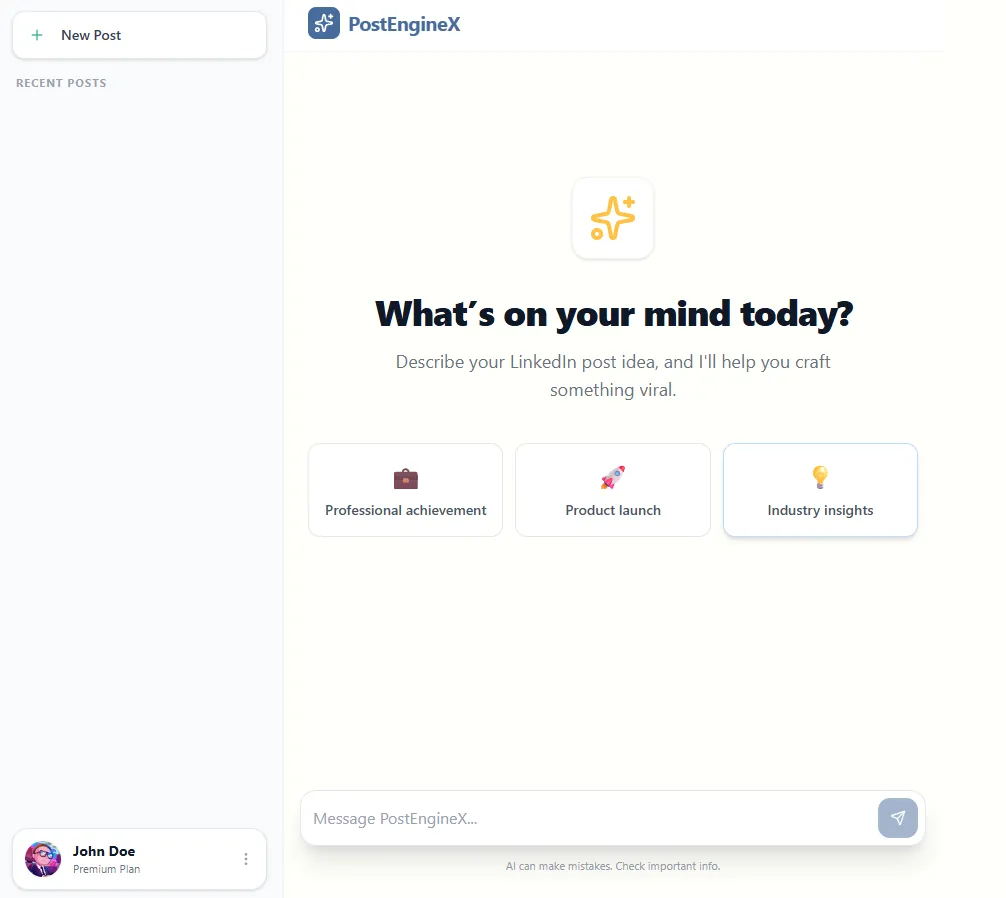
This is good enough for now.
I won’t get any designer’s award for this UI, but I can live with that.
So I turn to communication with the OpenAI API and communication from the backend to the frontend.
Streaming messages from backend to frontend
If you remember from the last email, one of the identified non-functional requirements was performance:
- AI calls are slower than regular database queries.
- If users wait 15 seconds staring at a blank screen, they’ll close the tab. The system must feel responsive.
- Therefore, real-time streaming is crucial so the app feels alive while the text is being generated.
Essentially, I need a way to implement one-way communication from the backend to the frontend.
After some research, here are some considered options:
- SignalR - used when you need two-way communication, like chat, collaboration, live notifications, etc.
- Server-sent events - used when you need one-way communication from the server to the client, like live logs, progress updates, and monitoring dashboards, where the client only listens and doesn’t send real-time messages back.
- gRPC - used when you need high-performance, strongly-typed communication between services, especially for backend-to-backend streaming, or microservices that exchange structured messages efficiently.
Since the response flows only in one direction, from the backend to the frontend, I chose the Server-Sent Events.
The frontend sends a message using a standard HTTP request, and the backend streams the response incrementally as it is generated. This way, the UI displays the response token by token, creating a smooth, real-time experience.
Now, how to implement this?
Luckily, in .NET 10, there is support for SSE using TypedResults.ServerSentEvents:
       public class GeneratePostEndpoint : IEndpoint
{
    public void MapEndpoint(IEndpointRouteBuilder app)
    {
        app.MapPost("/posts/generate", GeneratePost)
            .WithSummary("Generates a LinkedIn post based on the provided topic using AI streaming")
            .Validator<GeneratePostRequest>()
            .WithTags("Posts")
            .AllowAnonymous();
    }

    private static IResult GeneratePost(
        GeneratePostRequest request,
        GeneratePostUseCase useCase,
        CancellationToken cancellationToken)
    {
        return TypedResults.ServerSentEvents(
            useCase.ExecuteAsync(request, cancellationToken),
            eventType: "message");
    }
}
As for the use-case/handler, it is also simple.
It just passes the system prompt and user message to the IAIClient:
       /// <summary>
/// Use case for generating LinkedIn posts using AI.
/// Orchestrates the AI client to create professional, engaging content based on user topics.
/// </summary>
public class GeneratePostUseCase
{
    private readonly IAIClient _aiClient;

    public GeneratePostUseCase(IAIClient aiClient)
    {
        _aiClient = aiClient;
    }

    /// <summary>
    /// Generates a LinkedIn post by streaming AI responses based on the provided topic.
    /// Returns content chunks as they arrive, followed by a completion signal.
    /// </summary>
    public async IAsyncEnumerable<string> ExecuteAsync(
        GeneratePostRequest request,
        [EnumeratorCancellation] CancellationToken cancellationToken = default)
    {
        // Define the AI's role and content guidelines
        var systemPrompt = @"You are a professional LinkedIn content creator. Your task is to help users create engaging,
professional LinkedIn posts based on their topics. The posts should be:
- Professional yet conversational
- Engaging and authentic
- Well-structured with proper formatting
- Avoid emojis
- Between 150-300 words
- Include a call-to-action when relevant";

        // Create the user's request prompt
        var userPrompt = $"Create a LinkedIn post about: {request.Topic}";

        // Build the conversation messages
        var messages = new List<AiChatMessage>
        {
            AiChatMessage.System(systemPrompt),
            AiChatMessage.User(userPrompt)
        };

        // Stream the AI response chunks to the caller
        await foreach (var update in _aiClient.GetChatStreamingAsync(messages, cancellationToken))
        {
            if (!string.IsNullOrEmpty(update.Content))
            {
                yield return update.Content;
            }
        }

        // Send completion signal
        yield return "[DONE]";
    }
}
Where IAIClient is a simple implementation that wraps the ChatClient coming from the OpenAI NuGet package:
       /// <summary>
/// Implementation of IAIClient that communicates with OpenAI's chat completion API.
/// Handles message conversion and streaming responses from OpenAI models.
/// </summary>
public class OpenAiClient : IAIClient
{
    private readonly ChatClient _chatClient;

    public OpenAiClient(OpenAI.OpenAIClient openAiClient, IOptions<OpenAiOptions> options)
    {
        _chatClient = openAiClient.GetChatClient(options.Value.Model);
    }

    /// <summary>
    /// Streams chat completions from OpenAI by converting application messages to OpenAI format
    /// and yielding response chunks as they arrive.
    /// </summary>
    public async IAsyncEnumerable<AiStreamingUpdate> GetChatStreamingAsync(
        List<AiChatMessage> messages,
        [EnumeratorCancellation] CancellationToken cancellationToken)
    {
        // Convert application chat messages to OpenAI-specific message types
        var openAiMessages = messages.Select(m => m.Role switch
        {
            ChatRole.System => new SystemChatMessage(m.Content),
            ChatRole.User => new UserChatMessage(m.Content),
            ChatRole.Assistant => new AssistantChatMessage(m.Content) as ChatMessage,
            _ => throw new ArgumentException($"Unknown chat role: {m.Role}")
        }).ToList();

        // Stream the response from OpenAI and yield each content chunk
        await foreach (var update in _chatClient.CompleteChatStreamingAsync(openAiMessages,
            cancellationToken))
        {
            foreach (var contentPart in update.ContentUpdate)
            {
                yield return new AiStreamingUpdate(contentPart.Text);
            }
        }
    }
}
I also have the IAIClient implementation that uses the local Ollama model coming from Docker. This way, I can save some money during development.
Making the app more resilient
Currently, the app works if the OpenAI API is operating.
But what will happen if their API is temporarily down? Our app will fail to execute a request.
Is there a fix?
Yes. Microsoft.Extensions.Resilience.
This is a NuGet package built on top of Polly: the battle-tested resilience library for .NET. It provides retry policies, circuit breakers, and fallback logic.
So instead of calling the AI client directly, we wrap it using the decorator pattern that implements resilience:
       /// <summary>
/// Decorator that adds resilience (retry logic) to an IAIClient implementation.
/// Uses Polly to create retry operations so it can deal with transient failures.
/// </summary>
public class ResilientAiClientDecorator : IAIClient
{
    private readonly IAIClient _innerClient;
    private readonly ILogger<ResilientAiClientDecorator> _logger;
    private readonly ResiliencePipeline _resiliencePipeline;

    public ResilientAiClientDecorator(
        IAIClient innerClient,
        ILogger<ResilientAiClientDecorator> logger)
    {
        _innerClient = innerClient;
        _logger = logger;

        _resiliencePipeline = new ResiliencePipelineBuilder()
            .AddRetry(new RetryStrategyOptions
            {
                MaxRetryAttempts = 3,
                // The exponential backoff will wait the base time of x^attempt
                BackoffType = DelayBackoffType.Exponential,
                Delay = TimeSpan.FromMilliseconds(2000),
                OnRetry = args =>
                {
                    _logger.LogWarning(
                        "AI client operation failed. Attempt {Attempt} of {MaxAttempts}. Retrying after {Delay}ms. Exception: {Exception}",
                        args.AttemptNumber,
                        3,
                        args.RetryDelay.TotalMilliseconds,
                        args.Outcome.Exception?.Message ?? "Unknown error");
                    return default;
                },
            })
            .Build();
    }

    // Wraps the streaming call by first collecting it into an enumerator, and then
    // retrying from scratch if it fails partway through while still producing any items.
    // Retries from the start after discarding partial results
    public async IAsyncEnumerable<AiStreamingUpdate> GetChatStreamingAsync(
        List<AiChatMessage> messages,
        [EnumeratorCancellation] CancellationToken cancellationToken)
    {
        IAsyncEnumerator<AiStreamingUpdate>? enumerator = null;

        await _resiliencePipeline.ExecuteAsync(async it =>
        {
            enumerator = _innerClient.GetChatStreamingAsync(messages, it).GetAsyncEnumerator(it);

            // Try to get the first item to ensure the connection is established
            if (!await enumerator.MoveNextAsync())
            {
                throw new InvalidOperationException("Stream ended before producing any items");
            }
        }, cancellationToken);

        if (enumerator == null)
        {
            yield break;
        }

        await using (enumerator)
        {
            // Return the first item we already retrieved
            yield return enumerator.Current;

            // Stream the rest normally until cancelled
            while (await enumerator.MoveNextAsync())
            {
                yield return enumerator.Current;
            }
        }
    }
}
If the call fails, it waits and retries.
You’ll see this in your logs:
AI client operation failed. Attempt 1 of 3. Retrying after 2000ms. Exception: Name or service not known (ollama:11434)
Instead of a broken screen, the user waits an extra second and still gets their result.
At this stage, requirements 1 and 5 are implemented:
- Generate LinkedIn Posts
- Learn My Writing Style
- Save My Posts
- Manage My Account
- See Results in Real-Time
In the next post, I’ll handle points 2 and 3 of the requirements.
Every Friday I reveal insights with frameworks, tools & easy-to-implement strategies you can start using almost overnight.
Join the inner circle of 13,500+ .NET developers